HotelLobbyRap makes the viral Hotel Lobby AI trend video from two photos. Upload one photo for each performer, choose 480p or 720p, and get a 15-second MP4 of your duo rapping in the orange studio. No prompts, no watermark, no subscription; videos from $3.33 at 480p or $6.67 at 720p.
Best for: getting the full 15-second trend video without prompts, editing or a subscription.
Play with sound before you buy. Music and vocals are generated with each video from short pre-written lyrics, so every clip sounds a little different. Minor differences may appear in the final output.
AI-generated results may change appearance, hand, or accessory details and are not guaranteed to match the input photos exactly.
Create Your Hotel Lobby Video
01 + 02
One clear person per photo. Any phone photo works: large photos are resized automatically.
Your selected photos stay in your browser until you sign in and confirm permission to upload.
Your balance: Sign in to view This video uses 10 credits.
No subscription. One-time purchase.
AI results vary. Review the example and photo guidelines before purchasing.
TWO PHOTOS IN, ONE VIDEO OUT
From Two Photos to a 15-Second Video
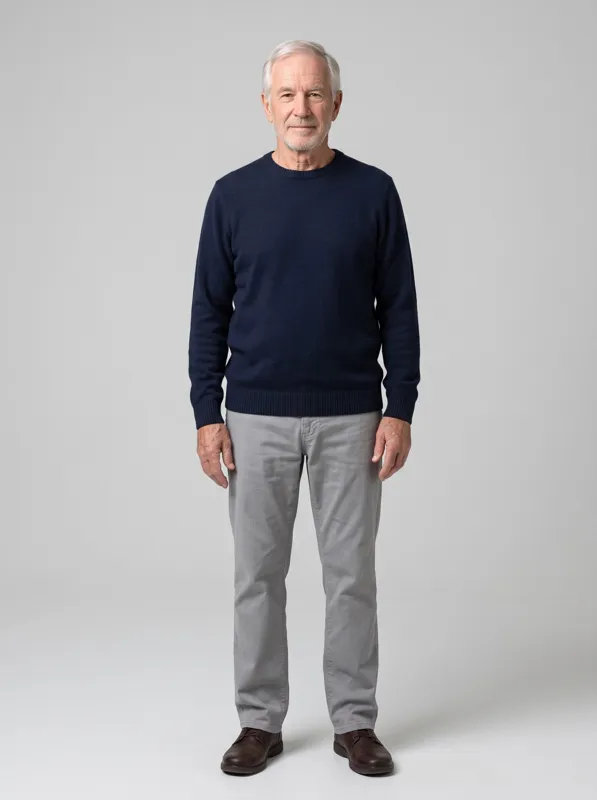
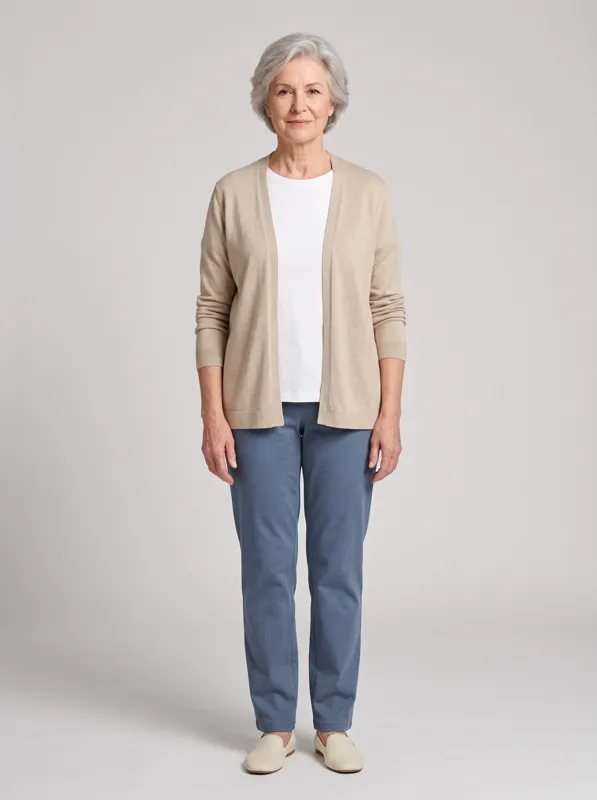
These are the exact two photos used for the video below, made with the same template the website uses. Photo 1 becomes the left performer and Photo 2 the right. We add the orange studio, the hanging microphone, the performance, the lyrics and the music.
Pick an occasion (optional), choose 480p (10 credits) or 720p (20 credits) and generate.
Play and download the MP4 from My Videos when it is ready.
More Examples
Two more videos made with the current template in our own tests, with different photos and lyrics. Results vary with the photos and from one generation to the next.
TEMPLATE TEST15 sec · 480p
Same pair, another take
About this example
A project test of the current Seedance 2.0 template with an earlier draft of the lyrics, outside the website flow. Music and vocals are generated with the video.
864 × 496 · MP4 · Published
TEMPLATE TEST15 sec · 480p
A younger duo
About this example
A project test of the current Seedance 2.0 template with an earlier draft of the lyrics, outside the website flow. Music and vocals are generated with the video.
864 × 496 · MP4 · Published
AI-generated results may change appearance, hand, or accessory details and are not guaranteed to match the input photos exactly.
These approved public examples are separate from private task storage and its seven-day access period. Your tasks are not automatically published.
The Hotel Lobby AI trend recreates Quavo and Takeoff’s HOTEL LOBBY performance on A COLORS SHOW: two performers, a bright orange studio and one hanging microphone. HotelLobbyRap is an independent tool and is not affiliated with the artists or COLORS.
The Hotel Lobby AI effect turns two photo subjects into a duo performance in an orange studio, with a microphone suspended between them. We provide the scene, performance, lyrics and music, so you can start with your photos and leave the editing to us.
You choose
Your two photos, their left and right positions, an occasion and an available resolution.
The template provides
An orange studio, a hanging microphone, a duo performance, and music and vocals generated for your video.
You receive
A downloadable MP4, a task you can return to in My Videos, and seven days of file access after the finished result is ready.
This is a fixed in-app template, not a downloadable editing project. Custom backgrounds, music uploads and a timeline editor are not available in this version.
How to Make a Hotel Lobby Video
01
Choose Your Duo
Add one clear photo for the left performer and one for the right. Check the previews and choose an available resolution. The credit cost is shown before you continue.
02
Sign In, Confirm and Generate
Sign in and confirm permission to use the photos. Use your balance or buy a one-time credit pack. Your task starts only after the required credits are available.
03
Come Back and Download
Follow the status in My Videos. You can leave the page and return to the same task. Once the result is ready, preview it and download the MP4 within seven days.
Use two separate photos of adults, one person per photo, with permission to use both photos and each person’s likeness. Photo 1 is the left performer; Photo 2 is the right performer. Use JPG or PNG, up to 10 MB each.
Good starting points
One person per photo, with the face clearly visible.
Even lighting, natural facial detail, and visible clothing.
An unobstructed face and enough space around the head and shoulders.
Avoid
Group photos or faces hidden behind hands, sunglasses, or large objects.
Heavy blur, strong beauty filters, and extreme low-light images.
Tiny faces or tightly cropped facial features.
Left and right follow your upload positions. You do not need to crop your photos to the video's 16:9 format. The template replaces the photo background.
Know What You Get Before You Generate
Show full specifications
Input
Use two separate photos of adults, one person per photo, with permission to use both photos and each person’s likeness. Photo 1 is the left performer; Photo 2 is the right performer. Use JPG or PNG, up to 10 MB each.
Scene
One fixed orange-studio duo template with a hanging microphone
AI model
Videos are generated by ByteDance’s Seedance 2.0 model (bytedance/seedance-2), which creates the picture, music and vocals together. There is no model selection; every new video uses this model.
Duration
15 seconds
Format
16:9 · MP4
Listed resolutions
480p / 720p
Audio
Music and vocals are generated with each video from short pre-written lyrics, so every clip sounds a little different. Minor differences may appear in the final output. Custom music uploads are not available.
Credit cost
A full 15-second video costs 10 credits at 480p or 20 credits at 720p. Both resolutions are available now.
Availability
Open now: sign in, buy a one-time credit pack, upload two photos and get your video in My Videos, usually within about 10 minutes. You can watch real examples for free before buying.
File access
Finished videos and associated input photos are available for 7 days after the result is ready. Unpaid drafts expire 24 hours after creation; cleanup waits if payment or processing is uncertain. Download your video before its expiry date in My Videos. Older videos keep their recorded expiry.
Prices shown exclude tax. Applicable tax, if any, is calculated at checkout.
A full 15-second video costs 10 credits at 480p or 20 credits at 720p. Both resolutions are available now. Video counts are based on full 15-second generations.
A full 15-second video costs 10 credits at 480p or 20 credits at 720p. Both resolutions are available now. The Starter pack ($9.99) covers two 480p videos or one 720p video; larger packs lower the cost to about $3.33 per 480p video or $6.67 per 720p video with the Studio pack. Prices shown exclude tax. Applicable tax, if any, is calculated at checkout. #
Does the video have a watermark?
No. The MP4 you download from My Videos has no watermark. #
Can I try it for free?
There is no free trial. You can watch full real examples with sound on the home page before buying, and if a generation fails for technical reasons, its credits are restored once. #
Do I need to write a prompt or edit the video?
No. Add two photos, choose who stands on the left and right, pick an occasion if you like, and select a resolution. We provide the orange studio, performance, lyrics and music. #
What photos can I use?
Use two separate photos of adults, one person per photo, with permission to use both photos and each person’s likeness. Photo 1 is the left performer; Photo 2 is the right performer. Use JPG or PNG, up to 10 MB each. #
Which AI model makes the video?
Videos are generated by ByteDance’s Seedance 2.0 model (bytedance/seedance-2), which creates the picture, music and vocals together. There is no model selection; every new video uses this model. #
Will the video look exactly like my photos?
AI-generated results may change appearance, hand, or accessory details and are not guaranteed to match the input photos exactly. #
Can I post it on TikTok, Instagram Reels or YouTube Shorts?
Yes. The video is 16:9; vertical platforms show it with bars above and below, so no cropping is needed. Turn on the platform’s AI-generated content label, and check the platform’s music rules before posting. #
Does the video include music?
Music and vocals are generated with each video from short pre-written lyrics, so every clip sounds a little different. Minor differences may appear in the final output. Custom music uploads are not available. #
Is this a subscription? Do credits expire?
No subscription. Each credit pack is a one-time purchase. Purchased credits do not expire. Refunds or payment reversals may adjust credits from that purchase. File storage has a separate seven-day limit. #
What happens if generation fails?
A confirmed technical failure restores the exact credits charged for that task once. This is not a cash refund. A temporary status or delivery interruption is checked before declaring failure. A completed video with unwanted visual details is not automatically a technical failure. #
Can I leave the page while my video is generating?
Yes. My Videos shows the task status, and you can leave the page and come back later. Generation time varies. #
How long are my photos and videos available?
Finished videos and associated input photos are available for 7 days after the result is ready. Unpaid drafts expire 24 hours after creation; cleanup waits if payment or processing is uncertain. Download your video before its expiry date in My Videos. Older videos keep their recorded expiry. #
 HotelLobby